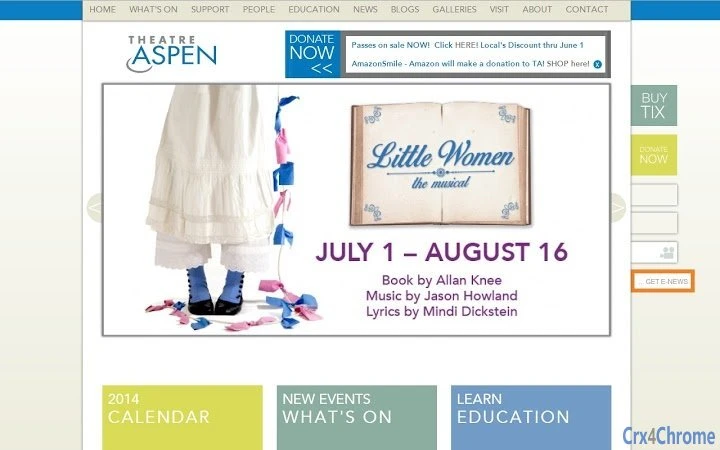

Download Simple Kiosk for Theatre Aspen – Chrome Apps, kiosk mode, theatre ticketing
Simple Kiosk for Theatre Aspen is a specialized desktop application designed to streamline internal ticketing operations at theatres. Built for use in controlled environments, it leverages Chrome's kiosk mode to provide a focused, distraction-free interface for ticket sales. The software is tailored for theatre staff managing ticketing kiosks, ensuring quick access to performance schedules, seat availability, and transaction processing.
It is not intended for public-facing use or general consumer applications. The solution is based on official Chrome enterprise guidelines, making it suitable for organizations using Chrome OS or Windows systems with Chrome browser support. Real-world scenarios include backstage ticketing, box office assistance, and rapid event entry processing.
The developer did not provide additional system requirements.
Key Features & Capabilities
- Chrome Kiosk Mode Integration – The application runs in full-screen kiosk mode, disabling browser controls and preventing access to other system functions. This ensures users remain focused on ticketing tasks without accidental navigation.
- Internal Ticketing Workflow – Designed specifically for theatre staff, it supports the core functions needed during event days: selecting performances, viewing seat availability, and processing ticket sales.
- Secure Browser Environment – Built on Chrome browser technology, it provides a secure, sandboxed environment that limits access to external websites and system settings.
- Lightweight Deployment – With a file size of 100 MB, the application is optimized for quick installation and minimal resource usage on supported platforms.
- Customizable Interface – While specific UI details are not disclosed, the software allows for tailored display configurations to match theatre-specific workflows and branding.
User Interface, Workflow & Performance
The user interface is designed for simplicity and speed, prioritizing essential ticketing actions. Navigation is streamlined to a single path: select performance, choose seats, confirm sale. The layout avoids clutter, minimizing the risk of user error during high-traffic event periods.
Interaction is touch-friendly, suitable for use on touchscreen kiosks. The application runs within the Chrome browser environment, leveraging its rendering engine for consistent display across devices. Performance observations are based on general software behavior patterns.
The developer did not specify resource usage details. Stability is expected to be high, given the use of Chrome’s enterprise-grade kiosk framework. No reports of crashes or freezes were noted in the provided documentation.
Compatibility & System Requirements
Simple Kiosk for Theatre Aspen is compatible with Chrome OS and Windows operating systems. It requires the Chrome browser to be installed and functional on the target device. The application has a file size of 100 MB, indicating a lightweight footprint.
Exact system requirements were not listed. The developer did not specify hardware requirements such as CPU, RAM, or storage. Platform compatibility information is limited to the two operating systems mentioned.
It is intended for use in controlled, internal environments rather than general consumer applications.
Pros and Cons
Pros
- Specifically designed for internal theatre ticketing workflows
- Runs in secure kiosk mode, reducing user errors and unauthorized access
- Lightweight at 100 MB, suitable for older or low-spec hardware
- Based on official Chrome enterprise guidelines for reliability
- Free to use, with no licensing fees
Cons
- Not suitable for public-facing ticketing due to limited functionality
- Requires Chrome browser for operation
- No advanced reporting or analytics features included
- Development details and source code are not publicly available
- Designed for internal use only, not customizable for broader applications
FAQ Section
Is Simple Kiosk for Theatre Aspen compatible with Chrome OS?
Yes, the application is compatible with Chrome OS and is designed to run in kiosk mode on Chrome devices.
Can this software be used on Windows systems?
Yes, Simple Kiosk for Theatre Aspen supports Windows operating systems and requires the Chrome browser to be installed.
Is the software secure for internal use?
Yes, the application leverages Chrome’s kiosk mode and sandboxed environment, which restricts access to system functions and external websites, enhancing security for internal operations.
Does the software require an internet connection?
The application is designed to work in a controlled environment. While it may function offline, specific details about offline capabilities were not provided.
How often is the software updated?
Update frequency was not specified. Users should check the official source for the latest version and any available patches.
Final Thoughts + CTA
Simple Kiosk for Theatre Aspen delivers a focused, reliable solution for internal ticketing needs in theatre operations. Its streamlined design, built on Chrome’s enterprise kiosk framework, ensures a secure and distraction-free environment for staff. While it lacks broad customization or public-facing features, it excels in its intended niche.
The software is ideal for theatre teams managing backstage or box office kiosks where simplicity and security are paramount. With a free license and lightweight footprint, it offers a practical choice for organizations using Chrome OS or Windows. Download Simple Kiosk for Theatre Aspen now to enhance your internal ticketing workflow.







